
My 2026 Guide to Perfect PC Settings for Infinity Nikki: Beyond Just Maxing Graphics
Master the perfect *Infinity Nikki* PC settings for 2026 with our expert guide, ensuring a breathtaking open-world dress-up adventure tailored for your rig.
Hey there, fellow stylists! As someone who's been diving deep into the world of Infinity Nikki since its release, I've got to tell you—it's not just another Gacha RPG. At first glance, you might think it's riding the coattails of games like Genshin Impact or Wuthering Waves, but trust me, the experience is as different as comparing a delicate, hand-stitched haute couture gown to a mass-produced t-shirt. The game is a breathtaking open-world dress-up adventure, and to truly appreciate the artistry of Miraland, you need your PC settings to be as finely tuned as a master tailor's sewing machine. Just cranking everything to "Ultra" won't cut it; it's about finding the perfect balance for your specific rig. Let me walk you through what I've learned, tailored for 2026.
First things first, let's talk hardware. Infinity Nikki is a demanding game, a true graphics gourmand that feasts on processing power. Even the minimum requirements are quite substantial, acting like a velvet rope at an exclusive fashion show. If your PC doesn't meet these, you simply won't get past the door. Here's the baseline you need to even step into Miraland:
-
CPU: Intel i5-6600 or AMD Ryzen 5 1500X
-
GPU: Nvidia GTX 1060, AMD Radeon RX 590, or Intel Arc A380
-
RAM: 16 GB
-
System: Windows 10 22H2 or later (Windows 11 is highly recommended for 2026).
If your setup is hovering around this minimum spec, don't worry! You can still enjoy the game, but you'll need to be strategic with your settings—think of it as creating a stunning outfit from a limited fabric selection. The goal is stable performance (aim for a consistent 30-45 FPS) at 1080p. Here's my tried-and-true "Performance-First" configuration:
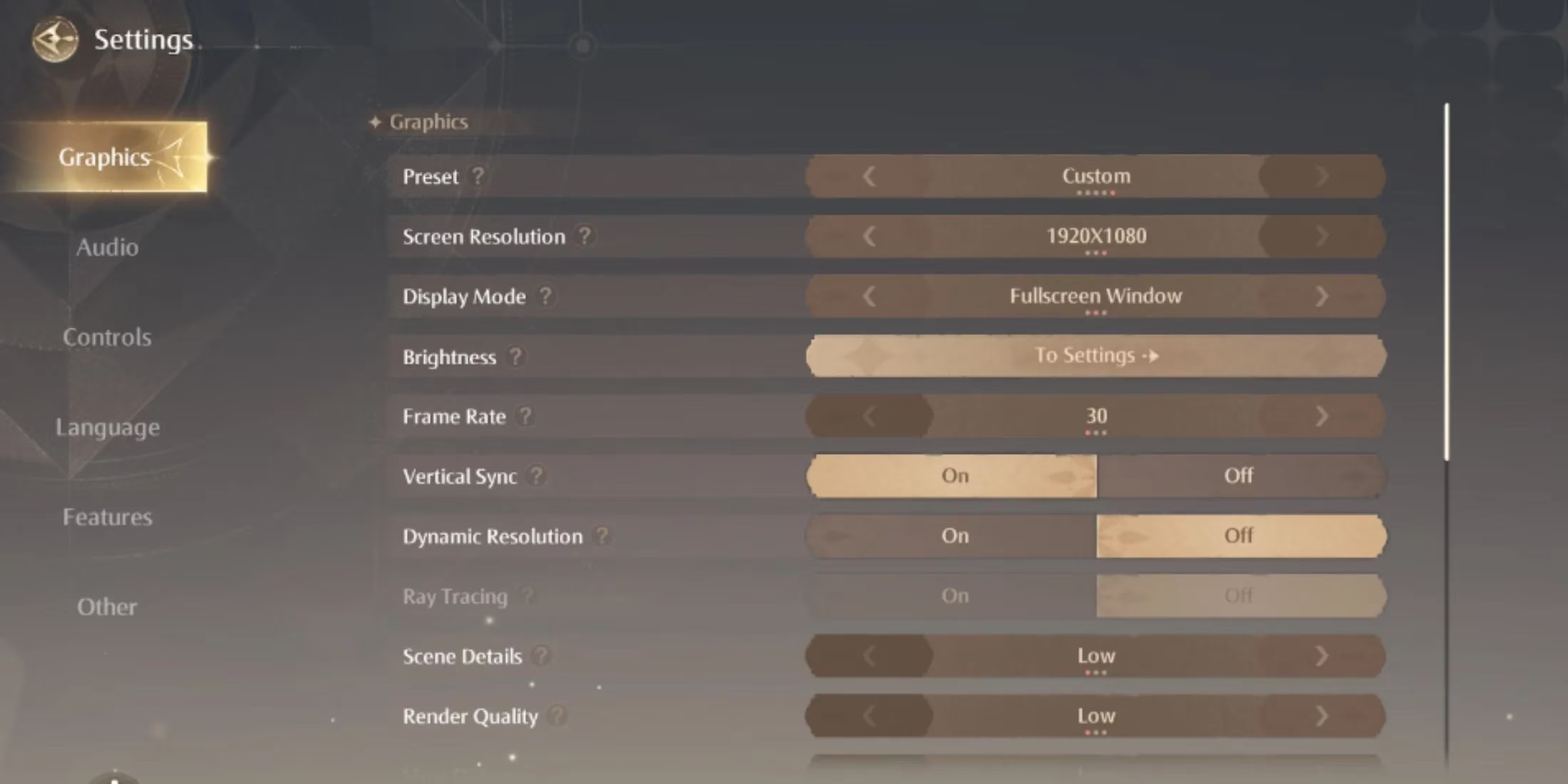
| Setting | Recommendation | Reasoning |
|---|---|---|
| Preset | Custom | Gives you full control. |
| Screen Resolution | 1920 x 1080 | The sweet spot for performance. |
| Display Mode | Fullscreen | Best for performance and immersion. |
| Frame Rate | Unlimited or 60 FPS Cap | Prevents screen tearing without V-Sync overhead. |
| Vertical Sync | Off | Can introduce input lag. |
| Dynamic Resolution | Off | Keeps image clarity stable. |
| Ray Tracing | Off | A major performance hit on minimum specs. |
| Scene Details | Low | Reduces polygon count on environmental objects. |
| Render Quality | Medium | A good balance for core visuals. |
| View Distance | Low | Less detail drawn in the distance. |
| Shadow | Medium | Lowers shadow resolution and complexity. |
| Texture | Medium | Uses lower-resolution texture files. |
| Post-Processing | Low | Turns off heavy effects like bloom and depth of field. |
| Anti-Aliasing | DLSS (Performance) | This is your secret weapon! Uses AI to upscale from a lower resolution, boosting FPS dramatically. |
| Motion Blur | Off | Can make the image muddy and hurts clarity. |
| Glow Effect | On | A light effect that adds charm without much cost. |
Now, for those of you with a powerful PC in 2026—think RTX 4070 or better, or an AMD RX 7800 XT and above—this is where the magic happens. Your rig is the runway model of computers, ready to showcase every intricate detail. The developers have crafted Miraland with an obsessive level of detail, from the way light filters through a forest canopy to the individual threads on Nikki's most elaborate dresses. To see it all, you need to unleash your hardware. Here's my "Visual Feast" setup for 4K (or high refresh rate 1440p) gaming:

-
Preset: Custom (Always!) 😎
-
Screen Resolution: The highest native resolution of your monitor (3840x2160 for 4K).
-
Display Mode: Fullscreen for the best performance.
-
Frame Rate: Unlimited. Let that high-refresh-rate monitor sing!
-
Vertical Sync: Off (use G-Sync or FreeSync if your monitor supports it).
-
Dynamic Resolution: Off. You're paying for those pixels, use them!
-
Ray Tracing: On. This is non-negotiable for the ultimate experience. The reflections in puddles, the soft shadows under lace, the ambient occlusion in dense foliage—it transforms the world from a beautiful painting into a living, breathing diorama. It's like the difference between a photograph and a hologram.
-
Scene Details / Render Quality / View Distance / Shadow / Texture / Post-Processing: All set to Ultra. Go ahead, indulge.
-
Anti-Aliasing: DLSS (Quality or Balanced). Even on powerful cards, DLSS in 2026 is so advanced it often looks better than native rendering while giving you a hefty FPS boost. It's the digital equivalent of a master restorer cleaning an old masterpiece.
-
Motion Blur: Off. Personal preference, but I find it obscures the gorgeous details.
-
Glow Effect: On. Adds that perfect fairytale sheen.
-
Screenshot Quality: Set this to 2160p (4K). You'll want to capture your creations in their full glory.
A couple of pro tips from my time in Miraland: First, always update your GPU drivers. In 2026, game-ready drivers are released faster than new fashion trends. Second, if you're using an NVIDIA card, play around with the settings in the NVIDIA Control Panel. Setting "Power Management Mode" to "Prefer Maximum Performance" for Infinity Nikki can smooth out frame pacing. Finally, remember that this game is about beauty and exploration. Sometimes, turning off the HUD and just wandering with these optimized settings is the most rewarding experience of all. It feels less like playing a game and more like curating a living art gallery that's as fluid and dynamic as a silk scarf in the wind. Now go forth and make Miraland your own stunning canvas!